

Workbook and live application in. Certify capture out.
A runner in your network drives the application through each case, a reviewer confirms what it chose, and the result imports into Certify. Object identity comes from your own Certify configuration, executed rather than guessed.
- CaptureWorkbook plus live application, driven on your runner
- ReviewChosen element, confidence and runners-up for every step
- Import and executeCapture XML and process-export ZIP into Certify
The workbook says what to do. The live application shows how.
Reads the workbook
The sequence, the target field of each step and the data. Headers are matched by meaning, so it tolerates typos, duplicate or missing step numbers and un-numbered preamble rows.
Walks forward through the live application
Later screens only exist after earlier steps run, so the runner performs each step to reach the next. Passive inspection of a single page cannot get there.
Routes every element to the right technology
SAP Fiori (UI5), WebGUI and WebDynpro are told apart per element by your Application Preset. SAP GUI is driven through SAP GUI Scripting.
Withholds passwords
A password is never sent to the service, written into the capture or stored in a bundle. The step is written commented out with an empty value, the way the recorder writes it, and someone fills it in once inside Certify.
The findby your recorder would write.
Certify does not record every attribute of an element. It runs your extensibility (XF) rule table, and the first rule whose class mapping matches decides both the component the element becomes and the ordered attributes that form its findby. Only the attributes the element actually carries are emitted, which is why a real identity is two or three attributes rather than forty.
AutoTestr executes that same rule table and your property definitions. For the same element and the same configuration it produces the same string: 61 of 62 identity strings byte-identical to Worksoft's own recorder on the reference captures.
<version>3.0</version><frame>do1</frame><instance>1</instance><tagname>INPUT</tagname>
<findby><n>CLASSNAME</n><v criteria="isequalto">wsTextbox</v>
        <n>TITLE</n><v criteria="isequalto">PO Number</v>
<n>IsDisplayed</n><v criteria="isequalto">True</v></findby>CLASSNAME is the class the rule maps the element to, then TITLE and IsDisplayed. Nothing else the element carries is emitted.Unsure means flagged, and you decide.
Before anything is generated, the review screen shows the element chosen for each step, the confidence, the reason and the runners-up. Override any of them and re-resolve.
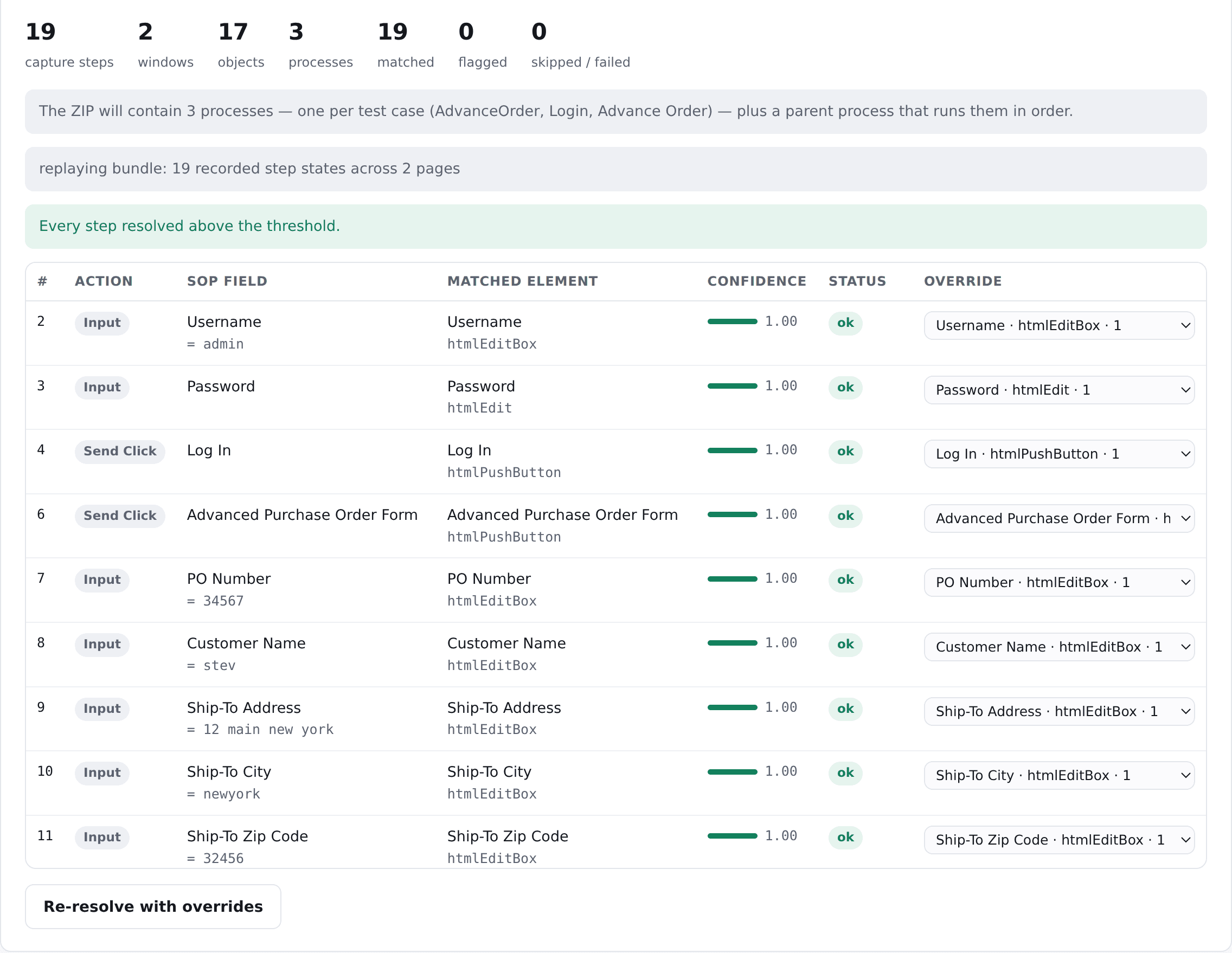
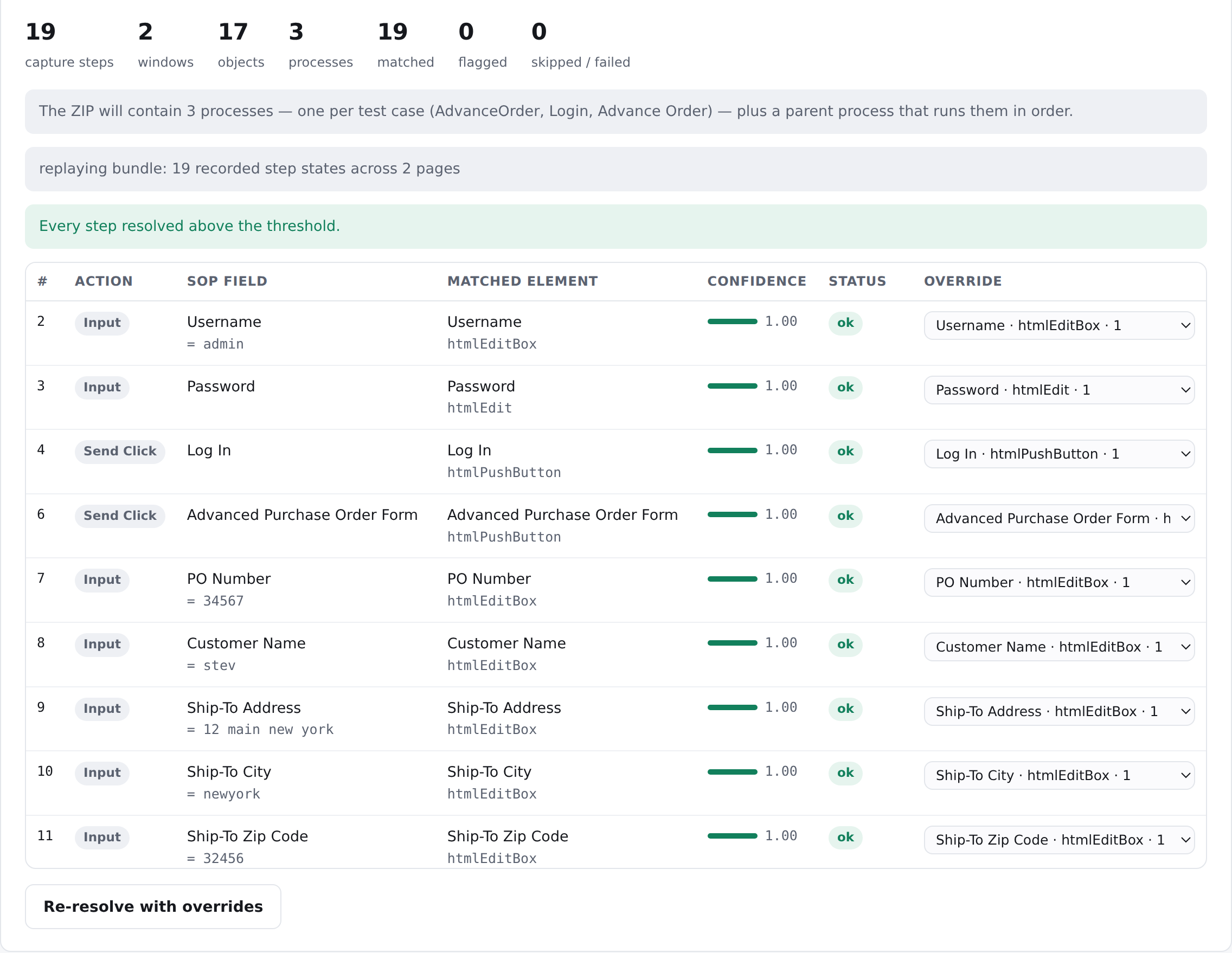
Warnings worth reading
“Another element on this page has the same identity” means the object is told apart only by position and will break when the page grows a row. “Identified by a value that changes” means the configuration picked something like a cart count.
Never a silent substitute
A step that cannot be resolved is flagged and written into the capture as a Certify comment. Where a more durable attribute is substituted, the swap is reported on the object and the step; you can switch substitution off for byte-for-byte output.
Reviewer-confirmed memory
Optionally, a choice a reviewer confirmed is remembered for that step on that screen, and an element a reviewer rejected is flagged rather than offered again. New facts arrive as a reviewable change, never a silent write.
Importing isn't the bar. Executing is.
AutoTestr hands back the two files Certify takes in. In a pilot, every case is imported and then executed in your own Certify, because that is the only result that counts.
Business Capture XML
Every object with the identity your XF rules produce, every step with its action and parameters.
Certify process-export ZIP
One process per test case, plus a parent process that calls them in order, with the consistency checks Certify applies on import already applied.
Certify placement
Application, version and folder are set at conversion, so the processes land where your team keeps them.
Applications: SAP Fiori, WebGUI and WebDynpro are Built; SAP GUI is Built per case (scripting must be enabled in client and server); one case that crosses browser and SAP GUI is Built, not run live. See what converts for S/4HANA.
See it drive an application, then judge the output.
A live walkthrough on a public demo application: the workbook, the runner, the review screen and the generated findby.
Worksoft and Certify are trademarks of their owner. MindMap AutoTestr is a MindMap Digital product; naming Certify describes the files AutoTestr produces and does not imply endorsement by Worksoft. Capability status words on these pages (Built, Built not run live, Roadmap) describe the current release.